Run 2 Unblocked — Play Free Online
More Runners & Arcade games
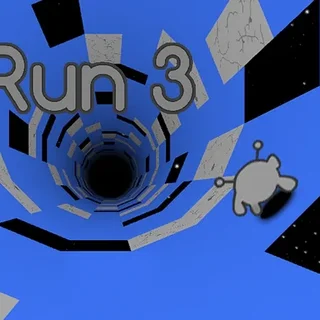

Run 2 unblocked: play Run 2 online free right here in your browser — no download, no sign-up, works on a school Chromebook.
Run 2 drops you into a sprawling three-dimensional tunnel suspended high in deep space. Your objective is simple yet demanding: sprint forward through each floating corridor without tumbling into the dark void below. Every stage presents an obstacle course of missing floor panels, sudden drop-offs, and fractured walkways that test your spatial awareness and reaction time.
What sets the game apart from standard endless runners is its dynamic gravity mechanic. As you steer into the left or right wall of a corridor, the entire tunnel shifts, turning that wall into your new floor. Navigating these rotation points lets you invent your own routes around gaping holes and keep your forward momentum intact.
Before entering the tunnel, you can choose between two distinct characters: the Runner and the Skater. The Runner delivers steady speed and crisp, precise jumps that excel on narrow platforms. The Skater glides at a much faster pace and catches massive airtime over long chasms, demanding quicker reflexes to manage the drift.
How to play
Guiding your character through the cosmic maze requires quick finger work on your keyboard:
- Steer left and right: Press the Left and Right Arrow keys or A and D to position yourself along the pathway.
- Jump: Tap the Spacebar, Up Arrow, or W to leap over empty gaps and broken floor tiles.
- Shift gravity: Run directly into any adjoining side wall to rotate the tunnel ninety degrees and make that surface the floor.
- Pause and restart: Press P to pause the action or R to immediately restart the current level after a fall.
Each level is structured as a standalone obstacle course. Reaching the far end of the tunnel clears the stage and unlocks the next trial, with layouts growing increasingly intricate as you advance.
Tips for clearing tough stages
- Rotate before you leap: If a gap ahead looks too wide to clear safely, steer into a nearby solid wall. Shifting gravity often reveals an unbroken pathway that bypasses the danger completely.
- Switch characters when stuck: If a level with tight zigzag turns proves frustrating with the Skater, switch to the Runner for superior directional grip. For stages with long stretches of missing ground, the Skater's leap distance makes life much easier.
- Keep your eyes downfield: Resist the urge to stare directly at your feet. Looking two to three tiles ahead gives your fingers enough time to prepare for sudden turns and gravity shifts.
- Feather the jump button: A short tap produces a quick hop that returns your feet to solid ground faster, helping you regain steering control for the next obstacle.
Similar games on Earn to Die
While Earn to Die and Zombie Derby 2 center around building powerful vehicles, upgrading engines, and plowing through hordes of obstacles, Run 2 delivers the same satisfying loop of rapid attempts and mastery through pure platforming reflexes. If you enjoy quick arcade sessions with instant restarts, titles like Monster Truck vs Zombie and Stupid Zombies offer engaging physics-based puzzles and driving challenges on the site.
Questions about Run 2
Is Run 2 unblocked at school?
Run 2 runs in an ordinary browser tab from earntodie.org, with nothing to download or install, so it plays on most school Chromebooks and work computers. If a network filter blocks the site, only that network's administrator can change it.
What is the difference between the Runner and the Skater in Run 2?
The Runner moves at a steady pace and offers precise jump control, making her ideal for narrow paths. The Skater travels faster and leaps farther with higher momentum, but turns more loosely.
How does gravity rotation work in Run 2?
Whenever your character runs into a side wall, the entire tunnel rotates ninety degrees. That wall instantly becomes your new floor, allowing you to bypass missing floor tiles.
What are the controls for Run 2 on desktop?
Use the Left and Right Arrow keys or A and D to steer across the track. Press the Spacebar, Up Arrow, or W to jump over gaps.
Can I play Run 2 on a Chromebook or laptop?
Yes. Run 2 runs directly in any modern desktop or laptop web browser using HTML5, requiring no plugins, installs, or user accounts.